Markleft: How I review claude plans in Markdown

AI output seldom meets the intent on the first prompt, so iteration is necessary. Today, iteration usually means providing feedback in a follow-up prompt, which leads to a rewrite of the whole document. The prompt that explains the intent behind the revision remains buried in the chat.
Imagine sending a colleague a five page document. They read it and have some concerns. The workflow would not be:
- Email me a prose description of everything you dislike
- I send you a completely rewritten document
- Then compare the two files and figure out whether I understood you
That is absurd—this workflow has been solved for decades by comments and tracked changes in Word, or by Suggesting mode in Google Docs.
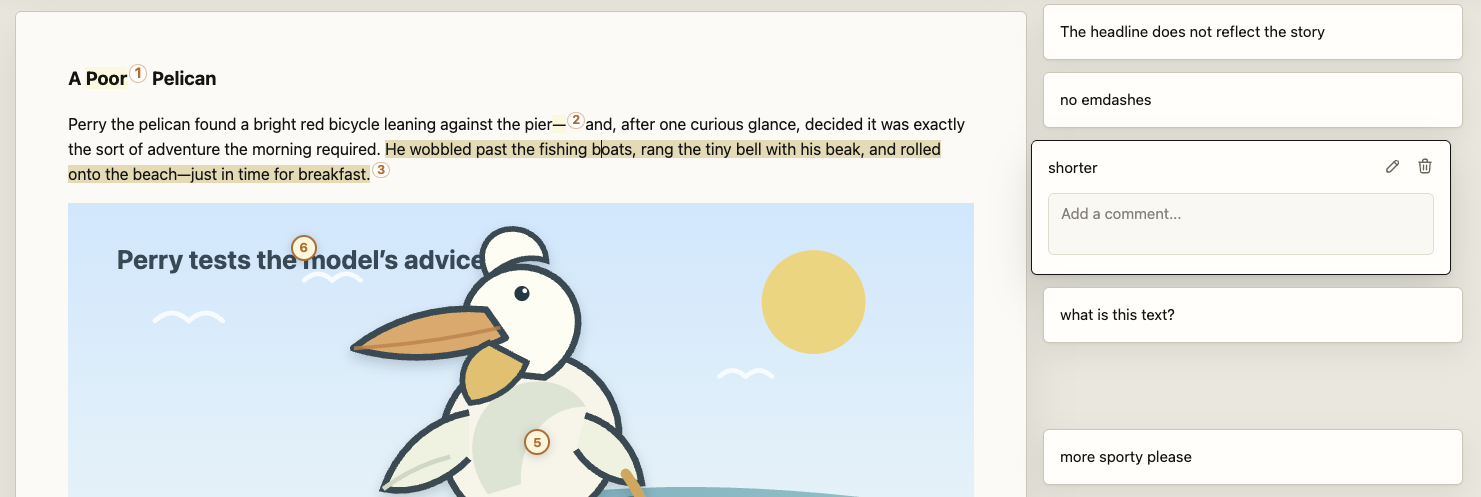
Want to see it in action? spoiler
Working with AI in Markdown and where it breaks
Let's play through the process of creating a document—and iterate once.
A prompt to Claude:
Please write a little story about a pelican on a bike in Markdown, and add a small SVG illustration of the pelican.
This results in:
| Markdown |
|---|
|
| Rendered |
A Poor PelicanPerry the pelican found a bright red bicycle leaning against the pier—and, after one curious glance, decided it was exactly the sort of adventure the morning required. He wobbled past the fishing boats, rang the tiny bell with his beak, and rolled onto the beach—just in time for breakfast. |

Step one: Collecting and formulating the critique
Turning your feedback into useful instructions is already a precision problem.
The headline promises the wrong story. Remove the em dashes, shorten the second sentence, fix the pelican's head, put the left foot on a pedal, and make the bird look sportier.
That sounds specific. It is not.
“The headline” works only because this toy document has one obvious headline. In a longer article you need to describe the headline you want to change.
“The second sentence” is way more specific, but it makes both the reviewer and the AI count sentences, hoping both count them the same way.
“The left foot” is worse: prose cannot point to the exact shape in the SVG that broke the illusion. That is why tools such as Figma allow comments directly on the design surface.
Now try giving the same kind of feedback on a multi-page document with repeated headings, nested tables, diagrams, and code.
Please update the second image in the third paragraph that displays the network architecture. Move the backup server to the top right, next to the second database server, in read-only mode.
In larger documents, another problem emerges: collecting the feedback in the first place. While reading paragraph 1, one may think, “This doesn't make sense,” but maybe paragraph 3 explains it. When such a thought comes up, I don't want to stop reading and formulate a prompt. I want to leave a mark, continue reading, and come back later.
Step two: Understand the change
Several approaches can help, but they share the same weakness: the AI produces a new document before the author can review the proposed changes in context.
We are still in the first iteration. An update executed by an LLM does not mean that our feedback was taken into account or that our intent was met. We are left with two tasks:
-
Find the change. One round of “spot the difference” across the whole document. Git can show diffs, but changes hidden behind rendered Mermaid diagrams, tables, and SVGs are much harder to grasp.
-
Recover the intent. Once we know what changed, we still have to remember which part of our original prompt the change was meant to address and decide whether the result actually satisfies the feedback.
Remember that more specific prompt:
shorten the second sentence
What if the first sentence is dropped in the rework by the AI? Mapping this prompt to the intent means:
- What was sentence 2 before the change?
- How did this sentence change?
- Does this reflect the intent of being shorter?
We should only care whether that sentence is now shorter.
The Idea—Suggestion Mode for Markdown
What is needed is a way to annotate parts of the document directly instead of describing their location vaguely, along with a way to review proposed changes against those annotations.
This is exactly what Markleft provides. It is based on three main components:
- A WYSIWYG Markdown editor for humans to create and edit comments, propose changes, and apply suggestions without thinking about the underlying format.
- A Markdown-compatible annotation spec consumable by AI, allowing users to comment on text, code, tables, Mermaid diagrams, images, and SVGs, and to propose suggestions.
- A prompt that tells the AI how to address the comments and instructs it to append suggestions only in Markleft.
AI gives you a Markdown . By clicking a bookmark you can review it as a Markup. You have remarks? Leave a note and save the Markdown. The file has a Markleft now. Pass it back to AI. Instead of a rewrite it makes Suggestions you can check and see if they cover your Markright.
Markdown remains the document format.
Markleft
The spec uses ordinary Markdown constructs to enable suggestion mode.

Markleft - the editor
The Markleft editor operates on local Markdown files. It runs as a bookmarklet in Chrome, so you can open a Markdown file, activate the bookmarklet, and get a full-featured editor with comments and suggestions.
It reads the Markdown file, parses its footnotes into Markleft annotations, comments, and suggestions, and renders them.
If a user comments on a selection or places a marker inside an image, the editor injects a corresponding Markleft footnote. When the user saves the file, the editor compiles a prompt that explains Markleft to the AI and describes how to compose suggestions that address the comments.
The AI composes suggestions and appends them to the Markdown file. The editor detects those changes and renders the new suggestions with links to the comments they address. Text is diffed within corresponding rendered elements. List items and table cells are paired before their text is compared, avoiding one meaningless diff across an entire structure. Image-only replacements become a before-and-after slider.
See it in action
Markleft - the spec
Annotations are just Markdown footnotes
An annotation—like a comment—consists of two parts: an anchor that identifies what it comments on and the comment itself. Markdown has a concept of footnotes that most Markdown renderers support. An anchor uses the format [^id-of-the-footnote], while its definition appears on a separate line in the format [^id-of-the-footnote]: body of the footnote. To encode additional information—such as selected words or x/y coordinates inside an image—we use a schema in the footnote ID itself.
For a text range:
This sentence needs less ceremony.[^range-prev-12-chars-14824-a1b2]

[^range-prev-12-chars-14824-a1b2]: Make this more direct.
range-prev-12-chars says that the annotation covers the previous twelve visible, non-whitespace characters. The remaining components provide identity and a content fingerprint so Markleft can detect when an anchor has become stale.
Other IDs encode other kinds of anchors:
image-X-Y-*stores normalized image coordinates.code-line-L-col-C-len-N-*identifies a code range.block-*addresses the containing block.comment-*represents a reply to another comment.
Because the comment is a footnote, Markdown tools preserve it even when they do not understand Markleft. To a normal renderer such as GitHub, it is just a footnote. To the AI and the Markleft editor, it identifies a point on an image or a highlighted sentence inside a text block.
Stable block IDs make structural changes addressable
To allow suggestions to target blocks reliably, we need stable identifiers. Markleft injects an HTML comment immediately before each real document block:
<!- - markleft:block id="babf825b" -->
Suggestions are unreferenced, append-only footnotes
A suggestion is a footnote definition with a reserved ID and intentionally no inline footnote anchor in the original body.
[^suggestion-s2-update-block-babf825b]: replacement Markdown
The ID says:
- this is suggestion
s2; - the operation is
update; - the target is block
babf825b.
Insert-before, insert-after, and delete operations use the same pattern. The last line of a suggestion body contains footnote anchors for the comments the suggestion addresses; that line is metadata, not part of the proposed content.
This is the crucial append-only property: an AI can add a proposal without receiving permission to alter the document it is reviewing.
Give it a try
- Show the bookmarks bar (⌘⇧B on macOS or Ctrl+Shift+B on Windows/Linux) in chrome
- Drag this link: Open in M← into chromes bookmark bar.
- Open a local Markdown file in chrome and click the bookmark
Find the source code and a full installation instruction here: https://github.com/martin-lysk/markleft